The Dagster and Airbyte Integration in Practice
The Dagster and Airbyte Integration in Practice
Airbyte counts connections, Dagster counts tables — get the asset keys right and dbt joins the graph for free
Airbyte and Dagster are both open source, and both keep turning up in the same kind of organisation: one that would rather run its own data stack than rent one. Airbyte Cloud is a feature-rich alternative if you want it, but self-hosting is what puts Airbyte on the shortlist for teams running on-prem. A platform team with real infrastructure capability can stand it up once and then let several departments move their own data through it, self-service — connectors and credentials in one place, and no ticket queue between an analyst and a new source.
What Airbyte does not do is orchestrate. It schedules: each connection gets a cron or an interval and it runs. There is webhook support, but webhooks here are a notification channel — they tell you a sync finished. They do not let you say what should happen next, and they have no way to express that a downstream step should be skipped because the sync failed. The moment you care about order — this sync, then those models, then that export, and nothing at all if the extract came back empty — you need something above Airbyte. That is where Dagster comes in, wrapping Airbyte connections into its own asset graph. It does that job well, and doing it well yourself comes down to one piece of know-how: understanding how each tool counts a unit of work. Get that right at the start and the rest is mechanical.
Four assets, one job
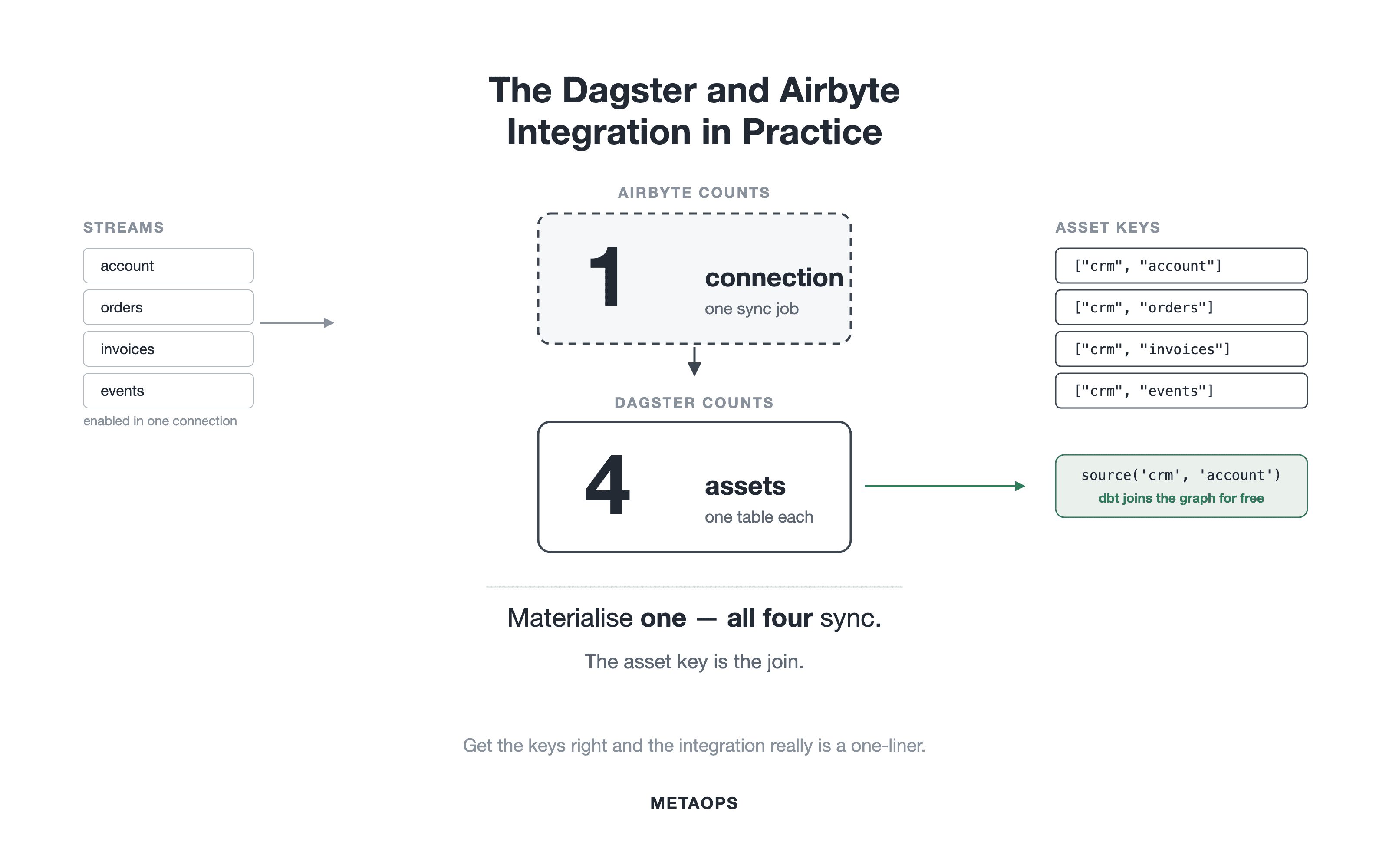
Airbyte's unit of work is the connection. A connection links one source to one destination and carries a set of streams — usually one stream per table. Airbyte syncs all of them together, in a single job. There is no way to ask it to sync just one stream.
Dagster's unit of work is the asset. In a warehouse, an asset is one table. Dagster wants to know which tables exist, which depends on which, and when each should refresh.
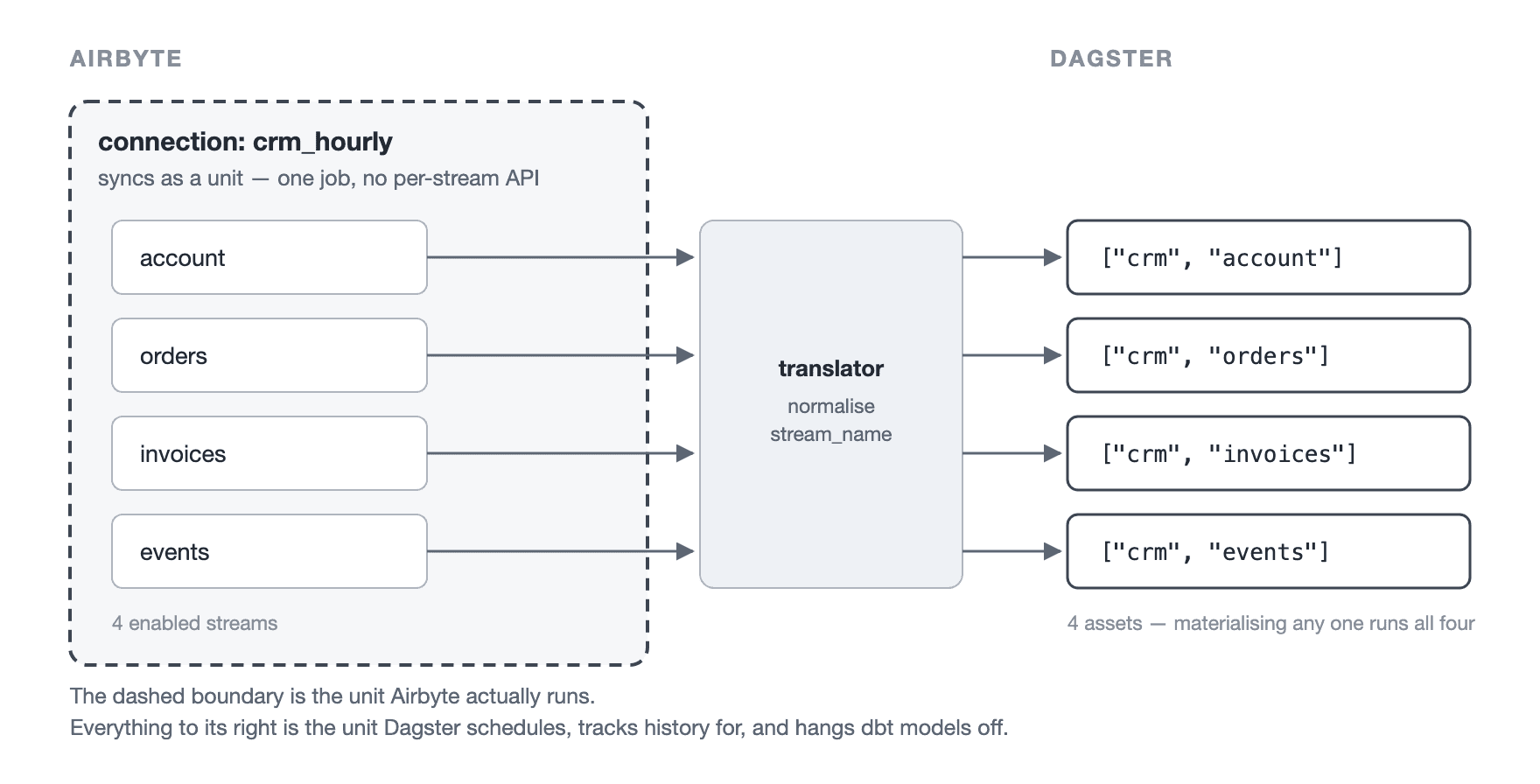
The bridge between them is dagster-airbyte, a Python library maintained as part of the Dagster project and installed alongside it. It creates one Dagster asset per Airbyte stream.
Here is the mismatch in one example. A connection carries four streams — account, orders, invoices, events — so the library gives you four Dagster assets. Airbyte, though, still has only one button. Click "materialise account" in Dagster and Airbyte runs the connection: all four streams move. Dagster records one asset as updated; the source system saw four tables extracted.
Four assets, one job. That ratio is the whole story, and the four sections numbered below are it showing up in four different places. Refreshing one table refreshes all of them. The same stream enabled in two connections gives one table two owners, and the code will not load. A schedule set in Dagster does not replace the schedule already set in Airbyte. None of these are bugs — they are the same mismatch, seen from four angles.
Everything here uses self-hosted Airbyte with the current dagster-airbyte API: AirbyteWorkspace and build_airbyte_assets_definitions. An older API built on airbyte_resource and load_assets_from_airbyte_instance still exists and still turns up in search results; the library's own migration guide points away from it.
Setting it up
The resource is a workspace, not a host and port. It needs both API base URLs, because the library reads connection configuration from the configuration API and launches jobs through the public REST API.
Client credentials are the right choice for anything deployed. Basic auth with username and password is also supported.
Then build the assets, filtering to the connections you want:
Two things about build_airbyte_assets_definitions are worth knowing.
It returns a list of asset definitions — one per connection, each holding one asset per enabled stream. It is not a single definition, so anything you would normally attach to a definition has to be applied across the list.
And connection_selector_fn filters connections, not streams. There is no stream-level filter in the API. Which streams exist as assets is decided in Airbyte, by which streams are enabled in which connection. Section 2 is what happens when that is left untidy.
One more piece of wiring: the workspace is also a resource. It has to be in Definitions(resources={"airbyte": airbyte_workspace}), or the assets will load and then fail when they run.
The translator, and why you always write one
A translator is the small class that decides what each stream becomes in Dagster: its key, its group, its tags. The library ships a default one, and the default produces this:
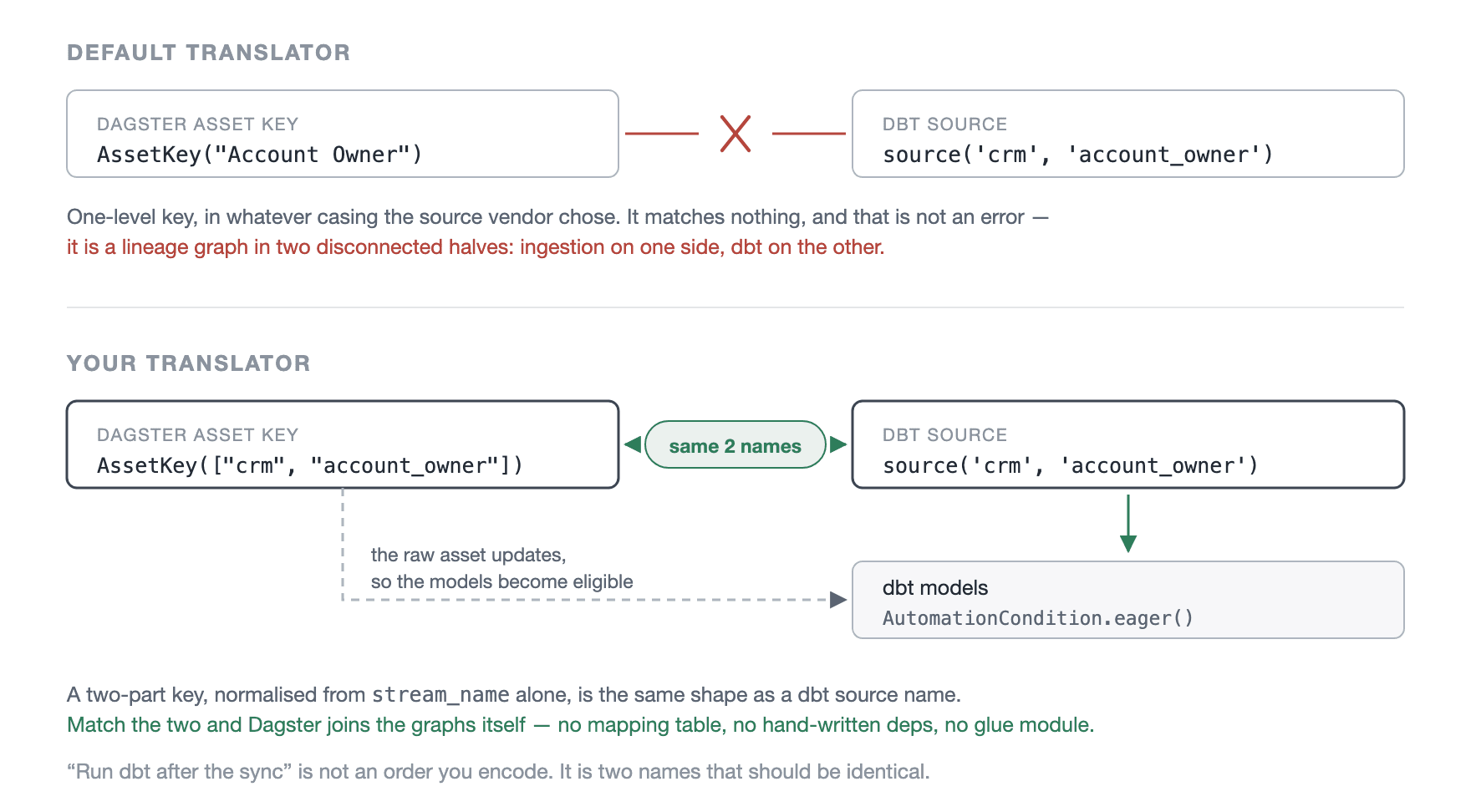
AssetKey(props.table_name) is a single-level key: the stream prefix plus the stream name, exactly as the source reports it. If the source is a SaaS API, that name is often something like Account Owner or invoice-line-items. Your warehouse stored it as account_owner. Your dbt sources are snake_case. The names do not match, and the result is not an error — it is a lineage graph in two disconnected halves, ingestion on one side, dbt on the other, nothing joining them.
So write a translator. One base class, one instance per source system, configured rather than subclassed:
That on_cron is the schedule for this connection, and it needs to be the only one. Setting it here does not switch off a schedule the connection already has in Airbyte — that is a separate change, made on the Airbyte side. Section 3 covers what happens if you forget.
Note that the automation condition goes into the translator, not onto the definitions that come back. Asset definitions have no public method for changing attributes after the fact; dagster.map_asset_specs(fn, definitions) is the supported way to do it if you need to. Setting it in the translator is simpler and keeps one source of truth per connection.
Two rules follow, and both matter more than they look.
Normalise in one place. Warehouses fold identifiers to lower case, dbt sources are snake_case, and the API reports whatever the source vendor chose. If the same normalising logic is written inline in three translators, it will drift in three directions, and the drift shows up as an asset that quietly stops connecting to anything.
Cadence belongs in a tag, never in a key. Use ["crm", "account"], not ["crm_hourly", "account"]. The key is the asset's identity: it is what past runs are recorded against, and what downstream models point at. Move that stream from hourly to daily and, if the cadence is in the key, you have not rescheduled an asset — you have deleted one and created another. The run history is stranded and every downstream dependency breaks. Put cadence in tags, where it can change freely.
Build the key from the stream name and nothing else
The translator receives a props object describing the stream: table_name, stream_prefix, stream_name, json_schema, connection_id, connection_name, destination_type, database and schema. It is tempting to build the key from database and schema, since that mirrors where the table actually lives.
Don't. Those fields are filled in when the graph is loaded, from the destination configuration. When a sync finishes, the library rebuilds the props to record what was materialised, and passes destination_type, database and schema as None. A translator that uses schema therefore produces one key at load time and a different key at run time. What you see is a log line saying An unexpected asset was materialized, and an asset that never turns green even though the sync worked.
Build the key from stream_name alone. It is the only field that is the same in both cases.
Free lineage to dbt
This is the payoff for the two-part key.
source('crm', 'account') in dbt is a two-part name. The Dagster asset key ["crm", "account"] is a two-part name. When dbt's source name and table name match the two parts of the Airbyte asset key, Dagster joins the graphs by itself. No mapping table, no hand-written deps=[...] list, no glue module that goes stale the first time someone adds a stream.
identifier is where the physical stream prefix goes. Airbyte writes the table as crm_account because the connection has a prefix; dbt still calls it source('crm', 'account'); the asset key stays clean. The prefix is a storage detail and should not become part of the name.
Once the graphs are joined, the dbt models need no schedule of their own. They carry AutomationCondition.eager() and run when the asset above them updates. The chain is: the cron fires the connection, the connection updates the raw assets, and that update makes the dbt models eligible to run.
Worth saying plainly: "run dbt after the sync" is not an order you have to encode. It is two names that should be identical. If you find yourself writing sensors or chaining jobs to express it, the names have drifted apart, and the fix belongs in the translator rather than in the scheduling.
1. One connection syncs every stream in it
Materialise any asset from a connection and every enabled stream in that connection syncs.
The mechanism is simple: the library reads the connection ID from the selected asset, launches one sync for the whole connection, and then records materialisations only for the assets you selected. The other streams still moved data. You just did not get an event for them.
Two consequences are worth planning around.
Backfills and one-off runs cost more than they look. Select three assets from one connection and you may trigger three full connection syncs, because Dagster runs them as three separate steps — every stream in the connection moves three times, to refresh three tables. Materialising the whole connection once is cheaper than materialising parts of it repeatedly.
You migrate a connection, not a table. Moving ingestion off an older orchestrator, you cannot move one stream. You move the connection, every stream in it, and every dbt model downstream of any of those streams — because the moment Dagster owns that connection's schedule, all its streams change cadence together. Plan migration waves by connection, and work out how much sits downstream before you start rather than after.
2. The same stream in two connections stops the code loading
A stream is enabled in two connections. This usually happens for a good reason: someone wanted account refreshed every fifteen minutes for one use case, and the rest of the source refreshed nightly. Both connections now produce an asset for account, both translators normalise it to the same name, and Dagster ends up with two definitions claiming to produce one asset. It refuses to load:
Fix it in Airbyte if you can. Split the connections so each stream has exactly one owner. If account needs a faster cadence, give it its own connection and disable it in the nightly one. That is five minutes of configuration, and it makes the problem impossible rather than managed.
If you cannot change Airbyte today, nominate one connection as the owner and give the duplicate a different key in the others, so the two cannot collide. Note what does not work: get_asset_spec must return a spec, and the library checks the type of everything it gets back. Returning None to "skip" a stream does not quietly drop it — it fails, and less clearly than the duplicate-key error did.
The cost, stated plainly. dbt depends on ["crm", "account"], so as far as Dagster is concerned only the owning connection refreshes that table. When the second connection runs, it does refresh the real table, and nothing downstream is triggered, because the models point at a different asset. You have traded a crash at load time for lineage that is quietly wrong — the worse of the two, because the crash at least told you.
So keep the renamed asset visible rather than hidden, tag it as a duplicate, and treat it as a ticket rather than a design. One stream, one connection.
3. Two schedulers, and why you switch Airbyte's off
Adding an AutomationCondition to an Airbyte-backed asset does not replace Airbyte's schedule. It adds a second one. If the connection still has its own schedule and Dagster also triggers it, both fire: duplicate syncs, extra load on the source system, and no single answer to "when does this table update".
Switch Airbyte's scheduler off on every connection Dagster owns. In the Airbyte UI that is Connection → Settings → Schedule type → Manual; over the API it is the connection's schedule type set to manual. Manual does not mean someone has to click a button — it means Airbyte only syncs when something asks it to, and from then on the only thing asking is Dagster.
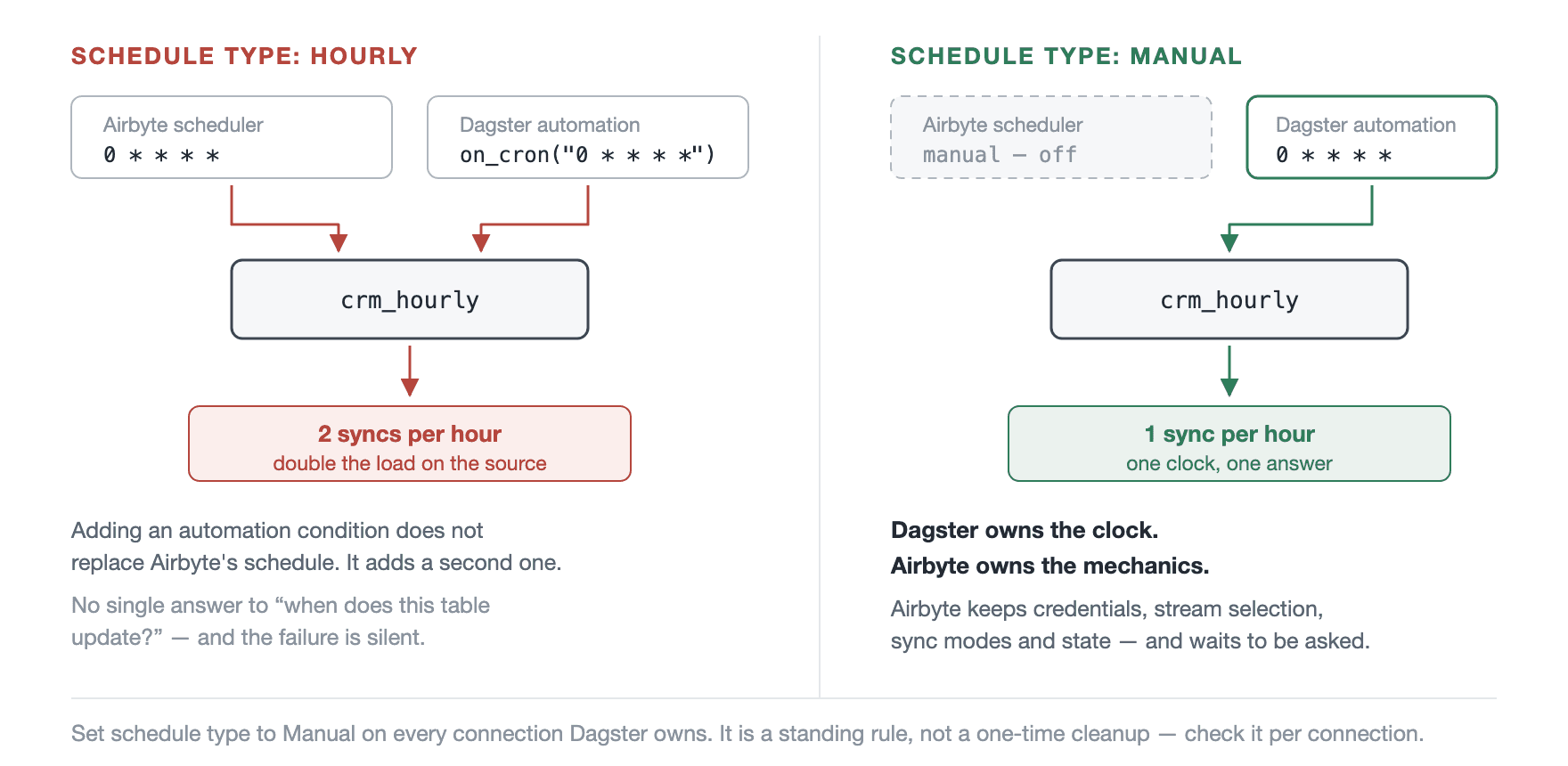
That is the whole answer to who owns what: Dagster owns the clock, Airbyte owns the mechanics. Every cron expression in the platform lives in a Dagster automation condition. Airbyte holds credentials, stream selection, sync modes and sync state, and does nothing until it is told.
This is a standing rule rather than a one-time cleanup, because the failure is silent and easy to reintroduce: someone creates a connection in the Airbyte UI, the default schedule is not Manual, and nobody notices until the source starts rate-limiting. Put it on the checklist for every connection you migrate — and once you have enough connections for that to be tedious, check it automatically. The configuration API reports a connection's schedule type, and a nightly job that flags any Dagster-owned connection whose schedule is not manual is cheap insurance.
4. What the metadata gives you, and what it doesn't
Each materialisation carries the metadata from the asset itself: the column schema derived from the stream's JSON schema, the fully-qualified table name, and Airbyte's own fields — connection_id, connection_name and stream_prefix. The column schema is the useful one; it gives you a record of schema changes over time for free.
What you do not get is run statistics. Materialisations are built from the connection's stream definitions, not from the finished job, so rows synced, bytes synced, sync duration and the job ID are not attached. Those numbers exist on the Airbyte side, but nothing in the default path copies them across. If you want volume metrics on the asset, that is code you write — query the jobs endpoint after the sync and attach them yourself. There is no setting that turns them on.
Running a full resync
A full resync is two calls to the same jobs endpoint, one after the other: clear the state, then sync.
The names differ between the UI and the API: the Airbyte UI calls this "Clear data", the API job type is still reset. Wait for the reset job to finish before launching the sync, or the two will race.
You can wrap this as an on-demand Dagster asset, so resyncs are recorded alongside everything else — but wait until the deployment is stable. A destructive operation whose trigger sits next to the ordinary materialise button is a bad idea while people are still learning the platform. Use the Airbyte UI, where it is deliberately awkward, until it is boring.
Rules, condensed
Always write a translator. The defaults will not match your dbt sources, and the result is a disconnected graph rather than an error message.
Two-part keys,
[source, stream], normalised in one function, built fromstream_namealone. Other fields are either missing at run time or drift.Nothing changeable in a key. Cadence, owner and layer are tags. The key is identity, and it has to survive a schedule change.
One stream, one connection. Renaming duplicates is a stopgap that costs you accurate lineage; splitting the connection costs five minutes.
Switch Airbyte's scheduler off — schedule type Manual on every connection Dagster owns. Dagster owns the clock, Airbyte owns the mechanics. Check it per connection, not once.
You migrate a connection, plus all its streams, plus every model downstream of them. Plan waves that way, and count what is downstream first.
It is one observation applied six times: Airbyte counts connections, Dagster counts tables, and the asset key is the join between two tools that otherwise know nothing about each other. Get the keys right and the integration really is a one-liner. Get them wrong and you lose a week to lineage that looks fine and isn't.
The patterns above are drawn from orchestration work across a number of client engagements — the specifics differ every time, the failure modes rarely do. MetaOps designs, builds and stabilises open-source data platforms: Airbyte, dlt, dbt, Dagster and Kubernetes, deployed as code with Terraform, Flux and GitOps, and shipped through CI/CD pipelines that make a platform change a reviewable pull request rather than an evening's work. If any of the above sounded like a description of your Tuesday, get in touch.


Abhivan Chekuri



Related Posts

governance
Oct 30, 2025
Ever inherited a data platform where nobody knows how schemas evolved, configurations vanish after migrations, and 500+ models have no lineage? While software development embraced DevOps years ago, data engineering got left behind - stuck with clickops, tribal knowledge, and the dangerous myth that "we'll automate later." We rebuilt our data platforms with a code-first approach using Terraform, dbt, and GitOps, achieving an 80% reduction in manual work and transforming unreliable deployments into boring, repeatable operations. Here's why if it's not in code, it doesn't exist - and why that principle saved our infrastructure.

data engineering
Feb 16, 2024
Developers have been tracking dependent API changes for years, we need to include data engineering as schema consumers that also need to be made aware of changes.